Health data SQL for Health Information Management

Real hospital data. Real SQL. Checked automatically.

A SQL practicum where students query a hospital EHR and billing database, and every answer is checked against the key.

  • 30 labs, from SQL basics to normalization
  • 179 questions checked automatically
  • A hospital database with 195 patients
  • Runs in the browser, nothing to install
SQLLab · SQL Workbench
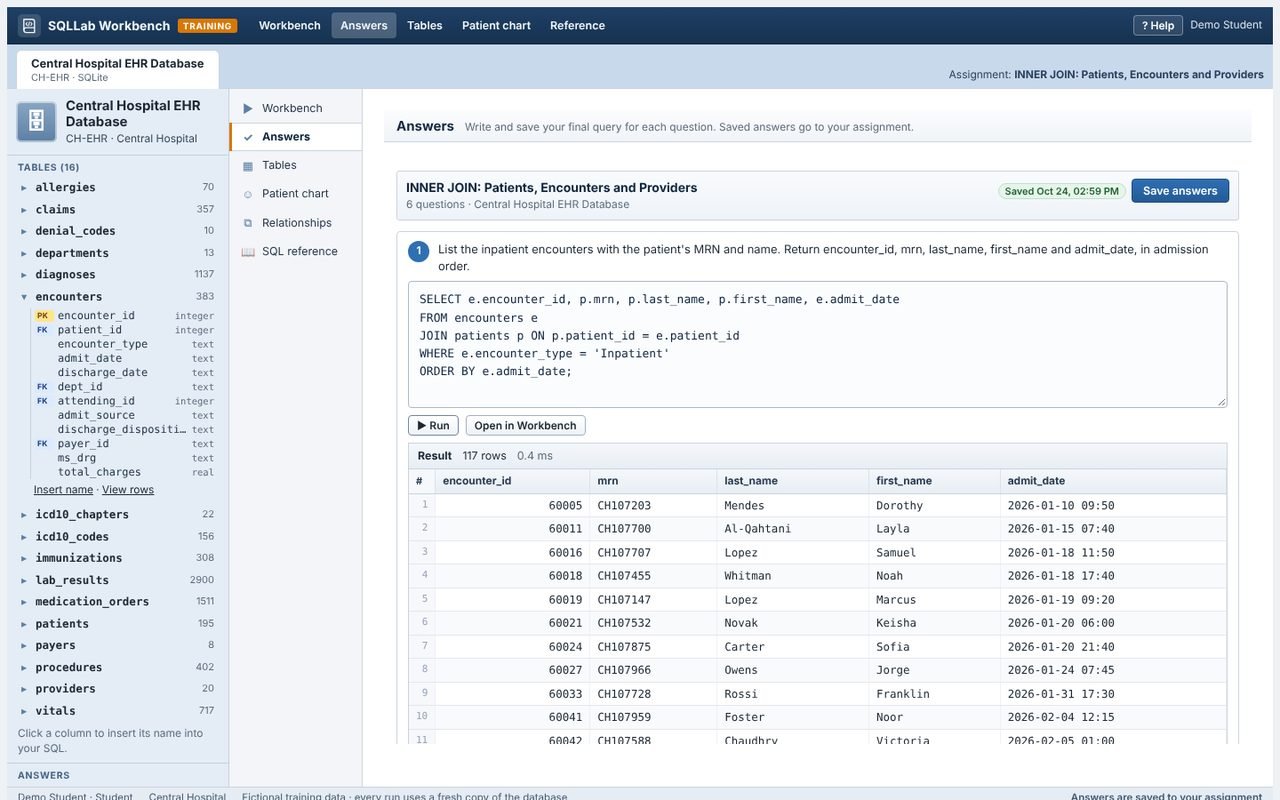
The SQL Workbench: the database schema on the left, a SQL editor and a results grid
30Labs, basics to normalization
179Auto-checked SQL questions
3Hospital databases
16Linked EHR and billing tables
The platform

Everything for a practical SQL course

Explore the platform →

SQL Workbench

Schema, editor, results and CSV, in the browser

Hospital EHR database

Patients, encounters, diagnoses, labs and claims

Answers checked automatically

Each saved query is compared with the key

A complete course

Word sheet, answer key and questions per lab

Normalization with real data

From a messy visit log to 3NF

Safe to experiment

Every run uses a fresh copy of the database

Patient chart
The Workbench's patient chart: one patient's rows in every table
Built around real questions

Answer the questions hospitals really ask

Readmissions, care gaps, denials and unbilled accounts, answered with SQL.

  1. Explore the schema
  2. Write the query
  3. Run on a fresh copy
  4. Check the result
  5. Save the answer
  6. Submit
Curriculum

30 labs in six units, ready on day one

Each lab has a student Word sheet, an answer key and auto-checked questions. Assign them in order: each builds on the last.

See all 30 labs →
Unit 1

Database foundations

5 labs
  • Tables, keys and relationships
  • CREATE TABLE and constraints
  • INSERT, UPDATE and DELETE
Unit 2

Retrieving data

7 labs
  • SELECT, WHERE and sorting
  • LIKE on ICD-10-CM codes
  • NULL, dates and CASE
Unit 3

Summarizing data

3 labs
  • COUNT, SUM and AVG
  • GROUP BY
  • HAVING and top-N reports
Unit 4

Joining tables

5 labs
  • INNER and LEFT JOIN
  • A discharge abstract
  • 30-day readmissions
Unit 5

Advanced queries

5 labs
  • Subqueries and care gaps
  • CTEs and window functions
  • Views and de-identification
Unit 6

Data quality and design

5 labs
  • A data quality audit
  • ER modeling
  • 1NF to 3NF, team capstone
Inside SQLLab

See what students and faculty work with

Answers
The Answers activity: one SQL box per question, saved to the assignment

Save one answer per question.

Assignment library
The library of 30 SQL labs with their illustrations

Assign any of the 30 labs in minutes.

Grading
The grading page with each saved query and its check result

Grade with every query and its check result.

For colleges

One workspace for your SQL course

For colleges →
Students working together at laptops

College admin

  • Manage faculty accounts
  • Add your logo and colours
  • Follow every assignment

Faculty

  • Add students or share a class code
  • Assign labs or write your own questions
  • See at a glance which answers match

Student

  • Query a real-feeling hospital database
  • Experiment safely, run as often as you like
  • See grades and feedback
How it works

From assignment to grade in four steps

  1. Faculty assign

    Pick labs, choose a class or team, set a due date

  2. Students open the Workbench

    Each assignment opens its hospital database

  3. Query and submit

    Save one answer per question, then submit

  4. Faculty grade

    Queries, check results and answer key on one page

Security & privacy

Safe by design

Students can experiment freely: nothing they run can change the stored database.

How we protect your program →
  • Student SQL runs on a fresh copy
  • Stored data never changes
  • Runaway queries are stopped
  • Key queries stay private
  • Same secure account as ChartLab
  • Nothing to install

Bring real data skills to your program

Hands-on SQL on health data, the skill analytics teams look for.